Why Pay Extra for AI?

Why pay extra for a chatbot bolted onto your case management?

"It's not just another AI tool that sits beside your case management system, and it's not just another case management system with a chatbot bolted onto it."

With SwiftCase Legal, the AI works from the matter itself. The case gets updated, the AI sees the updated case. No re-uploading. No re-explaining. Legal AI is included, from one seat.

JMRSTKAL

Built for solo and small firms.

AI Insight

Just now

"Found 3 conflicting testimonies in Exhibit B regarding the timeline..."
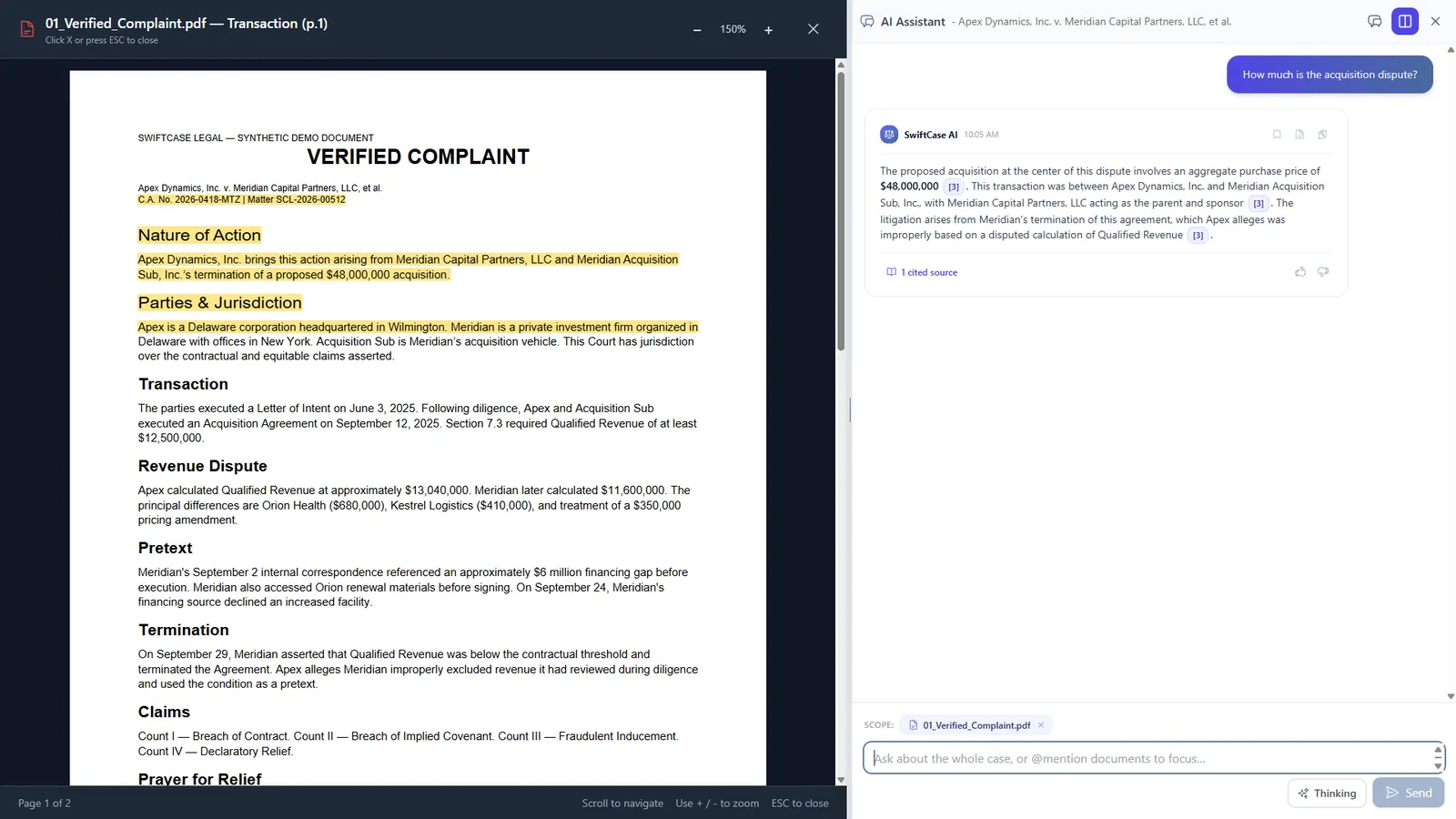
SwiftCase Legal source viewer

Illustrative product view. Apex Dynamics v. Meridian Capital Partners, when it appears, is a fictional matter.

Seat Minimum

1 seat minimum. No add-ons needed.

Infrastructure

Private data center. Never the public cloud.

Intelligence

Case-grounded AI. Every answer cites your documents.

Pricing

Solo $299/month. Firm $349/user/month.

The Side-by-Side Reality

The same comparison, on this page. Clio Work is quoted separately.

FeatureSwiftCase LegalClio + AI Add-on
Seat minimum1None
Real legal AI Included Quoted separately (Clio Work)
Reads your case files Yes Limited
Cites the exact source Character-level None
Case law research Included (beta) Clio Work, quoted separately
Sentence behind every flag Yes No
Says what it didn't cover Yes No
When the case changes The AI sees the updated case Re-upload and re-explain
Case management included Yes Yes
Private by design Yes Shared cloud
Transparent pricing Solo $299/month Add-on hidden

Watch this row: click the cite, check the source, verify the text.

Why pay twice for research?

Clio's research comes from vLex and is sold as Clio Work, separately or in higher bundles. SwiftCase Legal Research is included with Solo and Firm during the beta. No second research bill, and the court's own sentence sits behind every treatment flag.

See SwiftCase Legal Research (beta).

You open your case management, then you open your AI.

You open your case management system, then you open your AI. Now you have to move the case between them. Upload the documents, explain the matter, ask the question, then bring the answer back, and the case keeps changing. Now you're re-uploading it all over again. With a separate AI, you have to keep telling it what changed.

With SwiftCase Legal, the AI works from the matter itself. The case gets updated, the AI sees the updated case. No re-uploading, no re-explaining, no re-building the context.

Ask the matter, then check the source.

Instead of taking the case to the AI, you ask the case. Every single claim, date, and fact generated by SwiftCase Legal links directly back to the exact evidence that it came from. Click the cite, check the source, verify the text.

The row above is the one you can watch. See it on the walkthrough's fictional matter, from 3:35. Apex Dynamics v. Meridian Capital Partners is fictional.

The AI toolkit is included, not a per-seat add-on.

There's one seat minimum, unlimited matters, and the AI toolkit is included rather than forcing you to assemble a collection of separate add-ons.

Clio Work is quoted separately. SwiftCase Legal Solo is $299/month plus a one-time $299 setup fee. Firm is $349/user/month plus a one-time $349 setup fee. Enterprise is custom. Firm adds priority support.

SOLO

$299/month

+ Setup Fee (one-time): $299

For individual attorneys

  • Unlimited matters
  • Full AI toolkit across all cases
  • Document review and summaries
  • Case law research (beta): included
  • Role-based access controls
  • Private data center, Never Public Cloud
View Pricing
MOST POPULAR

FIRM

$349/user/month

+ Setup Fee (one-time): $349

For growing law firms (2-10 attorneys)

  • Unlimited matters
  • Full AI toolkit across all cases
  • Document review and summaries
  • Case law research (beta): included
  • Role-based access controls
  • Priority support
  • Private data center, Never Public Cloud
View Pricing

ENTERPRISE

Custom

For larger firms (11+ attorneys)

  • Everything in Firm
  • Advanced controls and permissions
  • Dedicated onboarding
  • Air-gapped, private, dedicated server
  • Priority Support
View Pricing

Moving your matters over.

We import your existing matters at no charge. The walkthrough is free, 15 minutes, and we reply within one business day.

Request a walkthrough

How the data is handled

How the data is handled.

This is confidential client information, sensitive documents, potentially privileged communications. SwiftCase Legal is designed around a private infrastructure model, rather than simply putting a firm's data into a public cloud.

The case files aren't being used to train someone else's AI model. How the data is handled is just as important as what the AI can do with it. The table above contrasts private by design with a shared cloud.

Research runs on our servers and our own AI models. Nothing goes to an outside provider.

Private data center

Private data center for every tier. Dedicated, air-gapped servers for Enterprise. Never public cloud.

Not used to train a model

Your case files never train AI models. Not ours. Not anyone's.

Role-based access

Role-based permissions so every attorney sees exactly what they should.

Questions the walkthrough answers

Is the AI included, or extra?

Included. The AI toolkit is included rather than forcing you to assemble a collection of separate add-ons.

Do I re-upload files every time the case changes?

No. The case gets updated, the AI sees the updated case. No re-uploading, no re-explaining.

Can I start with one attorney?

Yes. One seat minimum, which the comparison table lists.

Can I verify what the AI says?

Yes. Character-level citations. Click the cite, check the source, verify the text.

Will you import our existing matters?

Yes, at no charge, as the contact page already says. The walkthrough is free, 15 minutes, and we reply within one business day.

One matter, one workspace, one connected workflow from the first document to the final invoice.

Legal AI that knows your case.

Free 15 minute walkthrough, free import of existing matters, and a reply within one business day.

Free 15 minute walkthrough. We reply within one business day.

Request a Walkthrough